End of Windows 10 Support
Do you know the Windows 10 support end date? If you are a Windows 10 user, it’s time to mark your calendar. Microsoft has officially announced that support for Windows 10 will end on October 14, 2025.
This means your favorite operating system, which has powered billions of devices since its launch in 2015, is nearing the end of its journey.
But what exactly does “end of support” mean? How will it affect your computer, your apps, and your online safety? More importantly, what are your options after 2025?
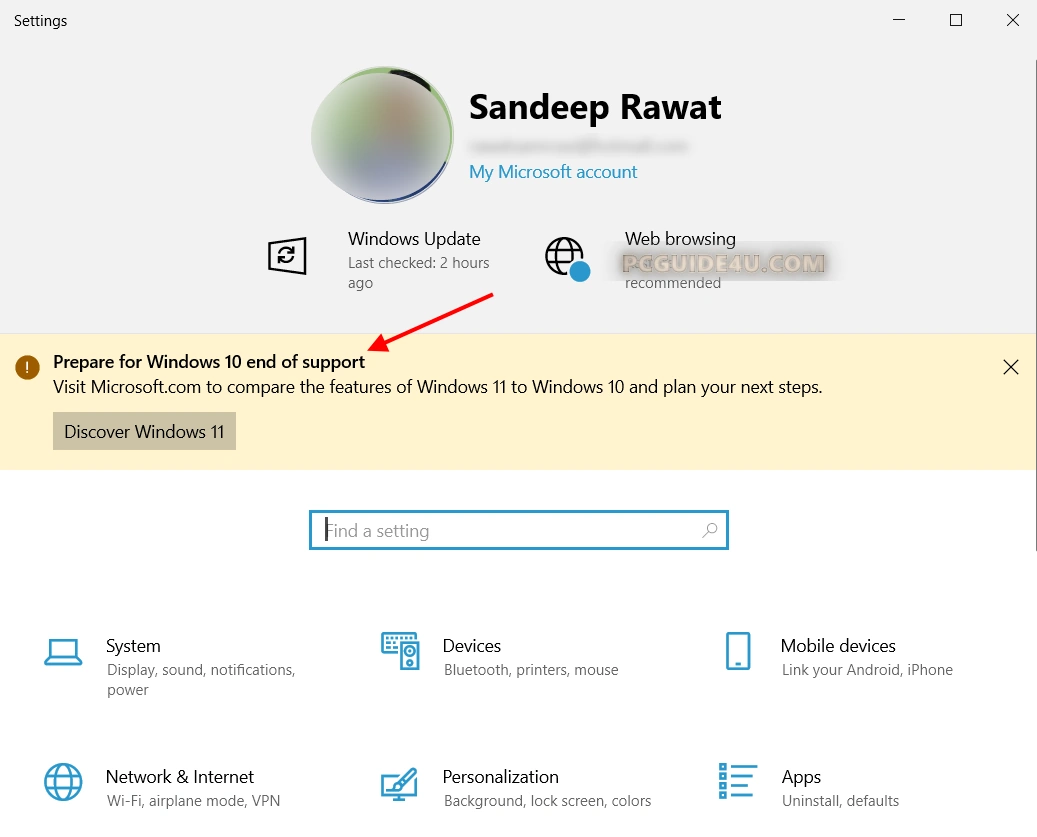
In this article, I’ll explain everything you need to know as a Windows 10 user—so you can stay informed and take timely action.
What Does “End of Support” Mean for Windows 10?
When Microsoft ends support for a product, it stops releasing security updates, bug fixes, and new features for that version of Windows. Starting October 14, 2025.
Windows 10 will no longer receive:
- Monthly security patches
- Critical vulnerability fixes
- Performance improvements
- Driver updates
Essentially, Microsoft will no longer maintain Windows 10—even though it might still “work.”
If you’re using Windows 10 after this date, your system will be increasingly vulnerable to security threats, malware, and software incompatibilities.
Why is Microsoft Ending Windows 10 Support?
Microsoft follows a predictable lifecycle policy for its operating systems. Windows 10 was released on July 29, 2015, and the company committed to supporting it for 10 years. The end-of-life date was clearly planned from the beginning.
The tech world is constantly evolving. Newer versions like Windows 11 are designed to support modern hardware, advanced security, and new workflows that Windows 10 can’t fully support anymore.
Ending support allows Microsoft to focus on the future.
How Many Users are Still on Windows 10?
As of early 2025, Windows 10 is still widely used by:
- Home users
- Businesses
- Educational institutions
- Government agencies
It’s estimated that over 60% of Windows PCs worldwide still run on Windows 10. This large user base will need to plan their transition before the deadline.
What Happens If I Continue Using Windows 10 After October 14, 2025?
You can continue using Windows 10, but it’s not recommended.
Here’s why:
1. Security Risks
- Without security patches, your PC becomes a target for cybercriminals. Even trusted websites and downloads can become unsafe on an unprotected system.
2. Software Compatibility
- Software developers will gradually stop supporting Windows 10. New apps and updates may require Windows 11 or later versions to run.
3. No Support from Microsoft
- If you encounter issues, crashes, or bugs—Microsoft won’t help. No live support, no help desk, nothing.
4. Third-party Software Issues
- Browsers like Chrome, Firefox, and antivirus programs will eventually stop releasing updates for Windows 10, making your device obsolete.
What Are My Options as a Windows 10 User?
Option 1: Upgrade to Windows 11
- Microsoft offers a free upgrade to Windows 11 for eligible devices. You can check compatibility using the PC Health Check Tool.
- If your device supports Windows 11, upgrading is highly recommended.
[Read: How do I Upgrade My Windows 10 to Windows 11?]
Option 2: Buy a New PC
- If your current system is too old for Windows 11, it might be time to buy a new computer. Look for laptops and desktops with Windows 11 pre-installed.
Option 3: Extended Security Updates (for Businesses)
- Microsoft will offer Extended Security Updates (ESU) for businesses and enterprises, for a price. However, this option is not available for regular home users.
How to Prepare for the Windows 10 End-of-Life Date?
Here are the steps you should take before October 14, 2025:
- Back Up Your Data: Use OneDrive or an external hard drive.
- Check Compatibility: Use Microsoft’s PC Health Check tool.
- Upgrade to Windows 11: Free if eligible.
- Explore Alternatives: Consider Linux if you prefer free, open-source OS options.
Should You Worry About This Change?
Not if you act now. Microsoft has provided ample time for transition. The upgrade process is smooth, especially if you’re using newer hardware.
Delaying the upgrade might expose you to digital threats, outdated applications, and even hardware malfunctions. It’s better to upgrade now rather than risk later.
What If I Don’t Want to Use Windows 11?
You’re not alone. Some users find Windows 11’s UI unfamiliar or prefer Windows 10’s layout.
If that’s the case, consider:
- Using Linux distributions like Ubuntu or Mint
- Buying a new PC with Windows 10 Pro (but still End of Life by 2025)
- Using virtual machines for legacy software
Final Thoughts
To sum up, Now you know the Windows 10 support end date is October 14, 2025. If you’re still using Windows 10, it’s time to prepare for the future.
Whether you choose to upgrade to Windows 11, buy a new device, or explore alternatives, one thing is certain: Windows 10 is reaching the end of its road. Stay proactive, stay secure, and don’t wait until the last minute.
Helpful Resources